Use QuickBooks desktop? Switch to Online for 50% off first year.
Classifieds
Seattle WA
28 December, 2021
7:46 PM
Description
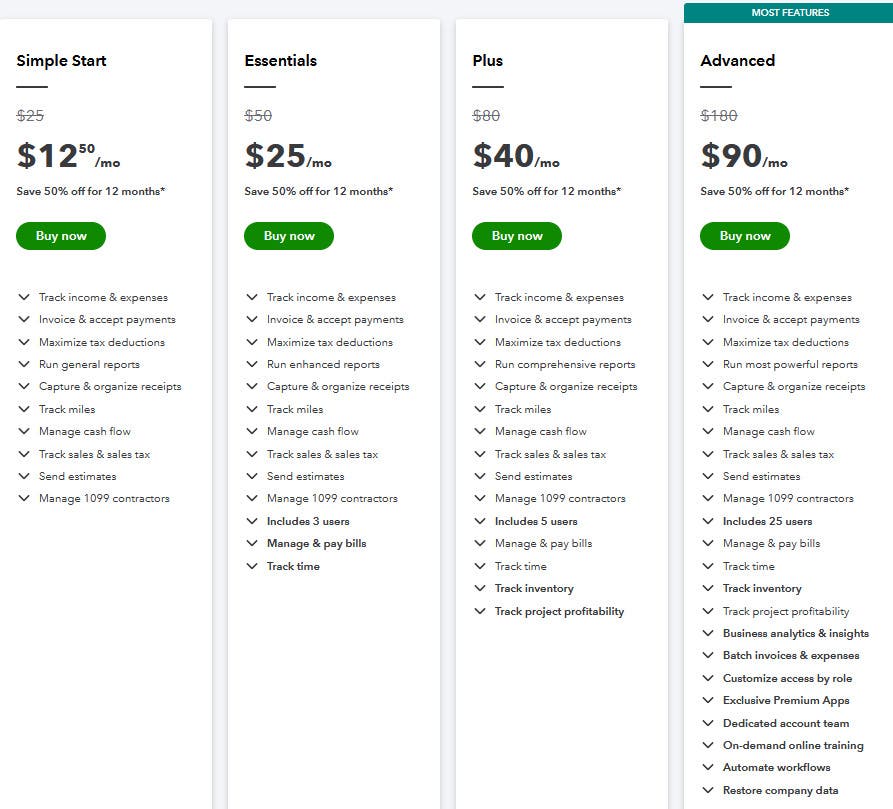
Are you using QuickBooks Pro, Premier, Mac, or Enterprise? Why not gain anytime, anywhere, and up-to-date access by switching to a QuickBooks Online version? And get 50% off your first year with a merchant account and payroll ordered through me, an Intuit reseller. Reply to this post with your complete contact information (company name, your name, address, city, state, zip, business phone, cell phone, and email) and year and version of desktop and the license number. Here are four choices from QuickBooks Online that I partner with: Simple Start: Track income & expenses Capture & organize receipts Maximize tax deductions Invoice & accept payments Track mileage Run 20 general reports Manage cash flow Send estimates Track sales & sales tax Manage 1099 contractors Download bank and credit card transactions, rename the payee, and categorize them App for a Smartphone to access your data and perform actions One user with two accountants or bookkeepers access Cost: $12.50 a month for the first year, $25 thereafter plus applicable taxes. Essentials: All of Simple Start plus the following: Run 45 basic reports Manage and pay bills Set up recurring transactions Track time Includes 3 users and two accountants or bookkeepers access Cost: $25 a month for the first year, $50 thereafter plus applicable taxes. Plus: All of Simple Start and Essentials plus the following: Run 65 advanced reports Manage and pay bills Set up recurring transactions Track time Track project or job profitability Track classes or locations Track inventory Includes 5 users and two accountants or bookkeepers access Includes time and/or report only users Cost: $40 a month for the first year, $80 thereafter plus applicable taxes. However, I recommend getting QuickBooks Online Advanced at 50% off the first year plus applicable taxes. The reason I say that is for $90 a month for your first year plus applicable taxes ($180 a month thereafter), you get all of Plus, Essentials, and Simple Start and more, $3,000 worth of useful, self-paced, web-based training, the ability to import invoices or sales receipts and expenses such as from a webstore, PayPal, Square, Shopify, or in Excel, have up to 25 users with customized roles or permissions, automate workflows, exclusive Premium apps, advanced financial reporting through Fathom, online ChronoBooks backups (let’s face it, when one does something new for the first time, one is likely to make mistakes), a dedicated customer success manager and team, 24/7 support, and a different experience than using Simple Start, Essentials, or Plus. You can compare them using the attached image and order them by contacting me. You can also call on me for help as I service what I recommend. BTW, I don’t recommend Self-Employed as you can’t upgrade it to the other versions. You can downgrade from one version to another. Contact me if you want to upgrade based on reading the above version features. Reply to this post with your complete contact information (company name, your name, address, city, state, zip, business phone, cell phone, and email) and year and version of desktop and the license number.
Discussion
By posting you agree to the Terms and Privacy Policy.